CHAUFFEUR SOFTWARE, UNDER YOUR BRAND
Run your chauffeur operation from one place
Bring bookings in, send jobs to your drivers and keep invoices and payments in order. Under your own brand.
Pricing and setup are agreed for your operation on a call.
Built around the chauffeur working day
Booking intakeOperator dispatchDriver appInvoices & booksThe work grows. So does the chasing.
Bookings arrive in different places. Drivers need updates. Invoices still need to go out.
Where is the driver?
The phone keeps ringing when job updates live in separate chats.
The schedule changes
A late booking or a changed pickup can affect the rest of the day.
A booking gets typed twice
Moving work between emails, spreadsheets and dispatch creates more admin.
Payments need chasing
Completed jobs, unpaid invoices and driver balances need to stay connected.
FROM BOOKING TO PAYMENT
One job record, all the way through
The booking, driver assignment, pickup evidence and accounting entries stay connected to the same job.
01
Booking
→
02
Job
→
03
Dispatch
→
04
Driver
→
05
Evidence
→
06
Invoice
→
07
Ledger
EVERY WAY A BOOKING ARRIVES
Bring the bookings together. Stop typing the same job twice.
Supplier connections, your booking site, corporate portals, bulk imports and manual entry create the same job record.
Booking emails can become jobs for you to approve. Email intake is available in Malaysia, Singapore and the UAE.
Explore booking intake → one job record
OFFICE + DRIVERS
Your office runs dispatch. Your drivers have the details.
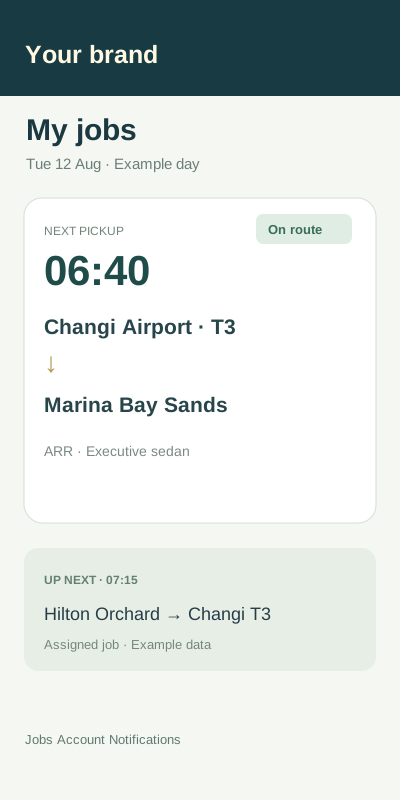
Assign work from the office. Give drivers the pickup, destination and instructions in one app. Follow the updates on the job.
✓
Assign work your way
Assign a named driver, or open a job to your own roster to bid.
✓
Send the details with the job
Pickup and drop-off details, passenger notes and instructions stay together.
✓
Keep pickup evidence with the job
Driver updates and proof of pickup return to the record your office sees.
DISPATCH
Job sent to James M. · 08:42
Job details
In progress
Airport transfer
Changi T3 · James M.
Pickup notes
Meet at arrivals, door 3
Evidence
Pickup confirmation
Photos
2 added
NEW BOOKING
Urgent
Airport pickup · Changi T3
Assigned: Sam K. · 14:00
Upcoming pickups stay visible
Today's schedule
08:00
10:00
12:00
14:00
16:00
Leah T.
Airport transfer
Hotel pickup
James M.
Airport pickup
Hourly booking
Sam K.
Corporate transfer
New airport pickup
Alex R.
Hotel pickup
Airport transfer
Planned
Hourly
New booking
UPCOMING PICKUPS
Airport pickup · Changi T3
06:40
Corporate transfer · CBD
07:15
Hotel pickup · Orchard
09:30
DISPATCH THROUGH A CHANGING DAY
See the work ahead. Keep the day moving.
Airport transfers, hourly bookings and last-minute changes all need drivers. Keep the day's work visible together.
✓
Adjust the assignment
Keep the latest driver and pickup details on the job, rather than in a separate message.
✓
Use your own roster first
Work with the drivers you know, then use the driver network when your roster has no one available.
✓
Keep upcoming pickups visible
Follow assigned and unassigned work without rebuilding the day in a spreadsheet.
INVOICES, PAYMENTS + BOOKS
Know what was invoiced, what was paid and what is owed.
Follow client invoices and payments alongside the jobs. Driver payout records show what you owe; they do not send money.
✓
Keep the invoice tied to the work
See the jobs behind a client balance and the payments recorded against it.
✓
Record both sides of the job
Client charges and driver pay remain separate, with entries in the double-entry ledger.
✓
Close the month with a record
Period locks keep a closed month from changing underneath the books.
O
CLIENT
Example corporate account
3 jobs · Example account
INVOICE
INV-1042 · Example record
Airport transfers · 3 completed jobs
PAYMENT STATUS
Thu 22 Oct
Client payment received
Recorded against INV-1042
DRIVER BALANCE
Driver pay and client rate stay separate
Payout records do not send money
JOB ENTRIES
Airport transfer
3 jobs · invoice · payment record
Completed
Corporate transfer
1 job · invoice raised
Completed
The rest of the operation belongs here, too.
Your booking site, corporate clients, drivers and accounts work around the same job record.
Operator dispatch
Assign jobs to your drivers
Supplier connections
Bring connected bookings in
Driver app
One app for the driver's work
Pickup evidence
Keep proof on the job
Booking website
Your domain and your brand
Corporate portals
Let account clients book
Invoices and reminders
Follow invoices and payments
Ledger and period locks
Keep the books connected
Built around how chauffeur work comes in
Work may come from your own customers, account clients or connected suppliers. Dispatch it through your operation.
Airport transfers
Keep the pickup, passenger details and driver assignment together for each transfer.
Corporate transport
Let corporate clients book through their portal and keep their work with the right account.
Chauffeur and hourly work
Give your drivers the route, timing and instructions for the job they are taking.
HOW BOOKINGS CAN ARRIVE
Your booking site
Corporate portals
Connected suppliers
YOUR BOOKING WEBSITE
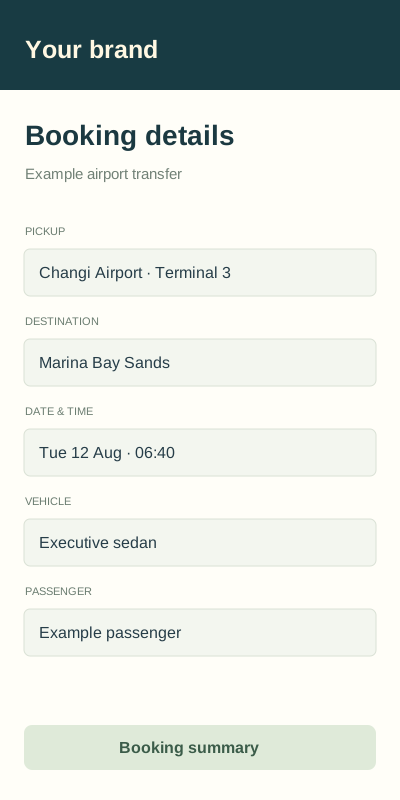
Let customers book with your business.
Your own website and domain bring bookings into the same system your office uses for dispatch.
Give corporate clients their own portal, and use your Stripe account for payments on your booking site.
Explore branded booking →YOUR OPERATION, YOUR BRAND
Keep your customer relationship. Bring the admin together.
Fusion Link connects the work behind your chauffeur service. Customers see your brand, and your team works from one set of records.
YOUR CUSTOMERS
Your own booking website
Use your domain, brand and Stripe account for your booking site. Offer account clients their own booking portal.
YOUR TEAM
Your drivers and dispatch
Keep your roster, driver assignments and job updates connected. Drivers use one app for the jobs sent to them.
YOUR BOOKS
A record behind the numbers
Keep invoices, client payments, driver balances and ledger entries linked to the work they came from.
From the booking to the books,
the same job stays connected.
SEE FUSION LINK IN ACTION
Show us how your operation works.
We will walk through booking intake, dispatch, drivers and accounting with you, then agree the setup and pricing for your operation.
Pricing and setup are agreed for your operation on a call.
Open a new country. The system already speaks it.
The system is set up for 48 countries. The parts that differ by country are already in place.
Your currency and locale follow the country you registered in. Licence labels, ID formats, document checklists, and the bank list follow each driver's own country. We pre-fill a tax rate in 25 markets, and you set your own rate in the rest.
- Currencies34 currencies · 48 countrieslive
- Exact moneyNo rounding driftlive
- Invoice taxPre-filled in 25 marketspartial
- Licences & IDsPer driver countrylive
- DocumentsExpiry trackedlive
- Address searchPer operating countrylive
- Flight trackingHK · MY · SG · THlive
- Audit logEvery action, every actorlive
- ISO 27001 · SOC 2Benchmarked, not certifiedbenchmarked